

Most websites lack an efficient internal link architecture. Important pages can sit multiple clicks deep. Orphan pages remain mostly unseen, and anchor text on links isn't descriptive. I see it in audits every month, and it holds back the rankings the content deserves.
In this guide, I'll share the process we use across hundreds of audits for Marketing Labs' clients.
What is an internal linking audit?
An internal linking audit is a systematic review of how the pages on your domain interconnect. It examines site structure, anchor text, crawl paths, and the flow of internal link equity.
It isn't just a broken-link check; it requires examining the complete information architecture from a search engine's perspective.
It assesses whether link equity reaches pages that should be visible in search engine results, or whether low‑value pages are overly link-equity-heavy. It surfaces orphan pages, high click depth, and thin anchor text, which weaken signals. It also shows whether your topical clusters support your important pages.
How internal linking strengthens SEO signals and topical authority

Internal links pass link equity from one page to another. That is a controllable distribution, and it is faster to adjust than external links. Anchor text then adds context, telling Google the destination page's purpose and which terms matter. This is simple internal link optimisation that pays off.
Strategic patterns stitch related content together so search engines see clear themes, with research on the impact of internal link structure demonstrating measurable improvements in topical authority and ranking performance.
Hub‑and‑spoke architecture, in which a pillar links to all spokes and each spoke links back, is a particularly popular model. It supports crawling of internal links and nudges search bots toward higher priority paths. Link counts and source page strength also signal importance, which is how to strengthen SEO signals with internal links without gaming the system.
“Internal links are super critical for SEO.” - John Mueller, Google Search Advocate
A few practical pointers that move the needle:
- Spread links from “power pages” (high authority or traffic) to commercial pages that need support.
- Use contextual links inside body copy; they send clearer signals than sidebar or footer links.
- Keep clusters tight: spokes should link to the pillar and to each other where it adds value.
- Aim for descriptive anchors that match user intent, not generic “click here”.
The scalable internal linking audit process

Start with a full crawl and clean baseline
I usually start an internal linking audit with a full crawl to systematically map URLs, status codes, anchor text, inlinks, outlinks, and crawl depth. I connect Google Search Console and Analytics APIs to our crawling tools, where possible, so that I can cross‑reference performance with structure. This sets a clean baseline for internal link analysis.
It's usually a good idea to enable JavaScript rendering when menus or links rely on JavaScript. I also run an initial crawl without robots.txt to identify blocked sections, then a standard crawl to mirror what Google sees.
Export and classify pages by intent
Next, I export key data. All Inlinks, All Outlinks, Response Codes, and a crawl depth view are exported to a spreadsheet. I add a column to tag page types and label commercial pages, pillars, and supporting content. This separation lets me see if authority flows toward commercial intent pages or just circles around blog posts.
Identify under-linked pages and weak authority flow
It's then important to check the Inlinks tab to see which pages receive the most internal links. This is how to spot under‑linked commercial pages that need support. I'd suggest using Link Score, which estimates internal authority, to find the best sources for new links.
Reduce click depth and surface buried sections

The image above shows a healthy crawl tree: short branches, clear hubs, and key sections near the root.
You can then review click depth. Any important page more than three clicks from the homepage gets flagged. I look for fast wins, such as adding links from category pages, popular guides, or the main nav. Reducing click depth is often the quickest way to improve internal linking for SEO on a big site.
The crawl tree graph in Screaming Frog is one of the fastest ways to understand site depth at a glance. Instead of scanning rows of URLs, you see how sections branch out from the homepage and where content starts to drift too far from the root. Buried pages usually show up as long, thin branches with no shortcuts back to stronger hubs.
This view makes structural problems obvious. Blog archives that only link in sequence, category pages hidden behind multiple layers, or legacy sections never re-integrated after a rebuild stand out immediately. When a supposedly important section sits further from the root than low-value content, the issue is architecture, not optimisation. The fix is deliberate linking from strong hubs, not more random links.
Find and fix orphan pages
You can hunt for orphan pages by comparing crawler lists to sitemaps, GSC, and Analytics. If a page deserves to exist, you need to give it contextual links from relevant content. You can also find orphan pages by navigating to Reports > Orphan Pages (via GSC/GA/sitemap integrations) to catch pages with no internal links and pages the crawl might have missed.
Audit anchor text for relevance and intent
Anchor text comes next. I usually build a PivotTable with destination URL and anchor text to spot generic phrases, exact‑match spam, or missing partial matches. I want natural variety with clear relevance, not ten versions of “click here”. This is where internal linking SEO shifts from random links to a deliberate internal linking strategy.
Clean up technical blockers
Technical housekeeping follows. Resolve 404 errors by updating sources or removing dead links - this is great for users, but also good for retaining as much internal equity as possible. It's recommended to replace internal links that have redirect chains with the final URL. I strip nofollow on internal links that block authority, unless there is a very specific reason to keep it.
Document fixes and build a repeatable roadmap
Finally, I document. I rate each issue by impact and effort, then create a sprint‑ready roadmap. Quick wins first. Big flow fixes next. Ongoing content edits after that. This keeps the work scalable, which matters if you want a repeatable process.
Always run an internal linking audit after structural changes
Internal linking rarely breaks overnight. It degrades quietly after structural changes, when pages move, but links don’t follow.
Any of the following should trigger an internal linking audit:
- CMS changes or platform migrations
- URL, category, or taxonomy restructuring
- Navigation rebuilds or menu changes
- JavaScript framework changes that affect rendering or linking
- Large content launches that introduce new sections or hubs
These changes often alter crawl paths, depth, and link equity flow without anyone noticing. Running an audit immediately after keeps important pages close to the surface and prevents authority from leaking into dead or low-value paths.
If you’ve changed structure, don’t assume internal links “mostly survived”, check.
Step-by-step checklist
If you want the process without the commentary, here's a concise flow:
1) Crawl the site properly
Run a full crawl to collect URLs, status codes, inlinks, outlinks, anchor text, and crawl depth. Enable JavaScript rendering if navigation relies on it. Run one crawl without robots.txt to find blocked sections, then a standard crawl to mirror what Google sees. Connect Search Console and Analytics for performance context.
2) Export and classify pages
Export All Inlinks, All Outlinks, Response Codes, and Crawl Depth into a spreadsheet. Tag each URL by page type (commercial, pillar, supporting) to see where internal authority flows.
3) Identify structural weaknesses
Review crawl depth and flag any commercially important page sitting more than three clicks from the homepage. Use the crawl tree graph to visualise buried sections and isolate folders or templates that are structurally disadvantaged.
4) Find link opportunities from strong pages
Check the Inlinks report and Link Score to identify pages with traffic, backlinks, and frequent crawling. These are your best internal link sources to support underlinked commercial pages.
5) Audit and improve anchor text
Group internal links by destination URL and review anchor text distribution. Remove generic anchors, avoid forced repetition, and use descriptive language that matches user intent. Remember that image links rely on alt text as the anchor.
6) Fix technical blockers
Replace internal links pointing to redirected URLs with direct links. Resolve or remove 404s. Remove internal nofollow unless there is a clear reason to block equity. These fixes preserve internal authority and improve crawl efficiency.
7) Resurface orphan pages
Cross-check crawl data against sitemaps, Search Console, and Analytics to find pages with no internal links. If a page deserves to exist, add contextual links from relevant content or hubs.
8) Prioritise and document
Score issues based on source strength, topical relevance, and impact on depth. Ship quick wins first, then tackle larger structural fixes. Document changes so internal linking doesn’t drift as the site grows.
Tips:
- If you use the same link twice on a page, assume the first contextual anchor may be treated as the primary one. Make the first one count.
- Avoid JS‑only links for mission‑critical paths; keep crucial links in standard HTML.
How to measure whether internal linking changes worked
Internal linking isn’t guesswork. If the changes matter, you should see movement quickly.
You may be able to start measuring impact around six weeks, depending on Google's crawl frequency and website size. You’re not looking for large-scale improvements; you’re looking for confirmation that search engines have noticed the structural change.
In Google Search Console, watch impressions and average position, specifically for the target page and the surrounding cluster. Rising impressions usually come first, followed by steadier rankings. If nothing moves at all, the page is either still structurally weak, doesn't add value, or isn't the best match for the queries you’re targeting.
Use URL Inspection to confirm the page is being crawled and indexed properly, and check crawl stats if they’re available. Pages that receive stronger internal links tend to be crawled more consistently, which is often the first quiet signal that the fix has landed.
Finally, rerun the crawl in Screaming Frog. Confirm that click depth has reduced, inlinks have increased, redirect chains are gone, and orphan pages are no longer isolated. If the crawl doesn’t reflect the changes you intended, search engines won’t see them either.
If you don’t see any of these signals improve, stop adding links and reassess. Internal linking works well when it’s done deliberately. When it doesn’t move, it usually indicates a deeper structural or intent issue, not a lack of link equity.
Internal linking execution and optimisation
Audits tell you what’s wrong. Execution decides whether anything actually improves.
This is where internal linking usually goes off the rails. People either change nothing because they’re cautious, or they change everything because they’ve found a lever that “works”. Both approaches fail for the same reason: they ignore control, sequencing, and feedback.
The goal here isn’t volume. It’s deliberate, testable change that improves authority flow without breaking the structure or muddying the intent.
Add links deliberately, not everywhere
Internal linking is easy to overdo. When people discover it “works”, they often add dozens of links in one sweep, tweak anchors aggressively, and touch half the site in a single session. That usually makes things worse, not better.
Start with five to ten high-confidence edits. Choose strong source pages, add clear contextual links to the pages that matter, then leave it alone. Watch how impressions, crawl behaviour, and engagement change over the next few weeks. If the signal moves, repeat the pattern; if it doesn’t, reassess the structure or intent before adding more links.
Internal linking works best when you treat it like a controlled experiment, not a site-wide rewrite.
Finding and prioritising internal link opportunities at scale
Random link drops do not move the needle; instead, identify power pages with backlinks and traffic, then add contextual links from those pages to valuable pages that need a lift.
Here's a full guide on finding internal link opportunities that actually improve rankings.
You can also use site search operators to mine content. A search like site:yourdomain.com “target keyword” pulls up relevant articles that should link to the target page. Then check pillar pages to ensure they reference every related cluster page and that the loop flows both ways.
Prioritise edits using evidence, not instinct
Prioritisation is simple when following evidence-based frameworks. Research on the determinants of internal audit quality shows that systematic scoring based on source strength, relevance, and impact produces superior outcomes. Source strength, topical relevance, and destination click depth decide the order. A strong source with close relevance to the target, but that reduces depth, should receive the first phase of edits. Add a link, test the impact, and repeat.
This is internal link optimisation at scale without guesswork.
A simple scoring matrix helps focus edits:
Factor | High (3) | Medium (2) | Low (1) |
|---|---|---|---|
Source strength | High traffic/backlinks | Moderate traffic | Low traffic/no backlinks |
Topical relevance | Tight keyword/theme match | Related but tangential | Loose connection |
Destination depth | ≤2 clicks | 3 clicks | ≥4 clicks |
Overall priority | 7–9 = edit first | 4–6 = secondary | 3 = backlog |
Tip: When two sources are equal, prefer the one with better rankings and more impressions in Google Search Console - those links are crawled and recrawled more often.
Using keyword data to identify strategic linking opportunities
Search Console is a goldmine for identifying linking opportunities. Export queries and pages, then group by keyword themes to see natural clusters. Pages that rank for similar terms should link to each other and to the pillar page that leads the topic.
The biggest potential winners here are pages that have rankings sitting between positions four and fifteen for target search terms and topics. A few well‑placed internal links can nudge those into the top three.
Pages with high impressions and low click-through rates could be given additional internal links and stronger anchors.
Additional tactics:
- Find “near‑miss” pages where Page A ranks for queries that Page B targets. Select the page that best matches the searcher's intent, and add a contextual link from A to B or B to A, with a descriptive anchor text that aligns with the search intent.
- Use “Also Asked” and related searches to diversify semantic anchors (e.g., “pricing guide,” “setup checklist,” “best practices”).
- Map queries to search intent and align anchors accordingly (informational vs. commercial).
- Refresh older posts with fresh internal links pointing to current commercial pages and updated guides.
Validate your topic clusters before adding more links
You’ve probably already built topic clusters and pillar pages using your keyword groups and cluster strategy. That’s essential foundational work - but it’s not enough on its own. A cluster performs best when it’s complete and structurally sound from an internal linking perspective.
Before you go hunting for new internal links, run this operational check on each cluster you’ve already defined:
- Does the pillar link to every spoke that actually matters? A missing spoke link means the cluster isn’t a network - it’s a one-way street.
- Does every spoke link back to the pillar? If supporting content doesn’t return authority to its hub, the cluster’s hierarchy is broken.
- Do related spokes link to each other where they add context? Connecting tightly related posts helps search engines see theme depth without forcing unrelated pages together.
- Are commercial or conversion-focused pages genuinely inside the cluster, not dangling outside like an afterthought? A cluster without commercial pages under-linked to the pillar is a content silo, not a strategy.
Clusters live or die by internal links. This check turns your existing cluster strategy - which you’ve likely already defined in those other guides - into a pass-fail test that reveals gaps you can act on today.
Decide what to keep, merge, redirect, or remove
Internal linking audits don’t just surface opportunities; they expose content that no longer earns its place in the structure. If every page is treated equally, authority is diluted, and clusters weaken over time.
When I find pages with low links, weak performance, or unclear intent, I run a simple decision check:
- Keep and improve the page if it has search demand, inbound links, conversions, or plays a clear role in a topic cluster. Strengthen it, update it, and support it with better internal links.
- Merge if the page overlaps heavily with another and competes for the same intent. Consolidate the content into a stronger page and redirect the weaker URL.
- Redirect if the page has links, history, or equity but no longer fits the site’s structure. Point it to the closest relevant alternative to preserve as much authority as possible.
- Remove the page if it has no demand, no links, and no strategic value. Don’t waste internal links propping up content that doesn’t deserve visibility.
This is where many sites quietly leak equity. Cleaning up weak or redundant pages often improves internal link flow more than adding new links ever will.
Internal linking best practices for large sites and eCommerce
At scale, internal linking stops being a content problem and becomes a structural one. You can add perfect contextual links in blog posts, but if taxonomy, navigation, and templates are working against you, authority still leaks and depth still grows.
This section focuses on the site-level elements that quietly control how internal link equity flows, regardless of how disciplined your content team is.
Set internal linking rules for scale
Scaling needs rules. It's important to document simple content rules so writers and editors don't second-guess anything. Every new post should link to two or three related posts and one or two service or category pages. Service pages can link down to key guides and up to the main service hub. This keeps authority flowing in both directions.
Structural elements that support internal linking
Category and tag structures are important on large sites because they create automatic internal links. Use them to group content tightly around themes, and not as a dumping ground. One of the biggest issues for eCommerce stores is data management, and it's far more important than many realise.
Breadcrumbs help users and bots understand structure, depth and relationships, and provide consistent links back to parent pages. For eCommerce, ensure product pages link to related products and parent categories, while category hubs link to main categories. This should sound like common sense, but many CMS's and themes get this wrong.
Mega menus and HTML sitemaps can help reach deep pages, but keep menus tidy and focused on real user needs. Related content areas are fine when they're tuned to surface relevant, evergreen pieces that support conversions, not just the latest posts. However, sometimes they're left to their own devices and end up including generic products or posts.
Pagination needs clean links, and while rel="next" and rel="prev" are no longer technically used by Google, a consistent pattern still helps crawling and user experience. I usually still recommend keeping rel="next" and rel="prev" in place and ensuring you self-canonicalise the paginated pages.
By implementing pagination correctly, you are giving search engines a strong hint that you’d like them to consolidate indexing properties, such as internal and external links, from the component pages/URLs to the series as a whole (i.e., links should not remain dispersed (diluted) between /page-1, /page-2, etc., but be grouped with the sequence).
eCommerce-specific internal linking considerations
More tips for large eCommerce catalogues:
- For faceted navigation, expose only valuable, index‑worthy facets. Keep the rest crawlable for users, but prevent spinning out near‑duplicate URLs.
- When products are permanently out of stock, add a link to the closest alternative and the parent category.
- Avoid linking to internal search results pages unless they act as curated hubs with genuine value.
As URLs change or pages get pruned, internal links decay. A semi-regular sweep to fix links and add new ones into fresh content will improve internal linking on big sites without a rebuild.
Common internal linking mistakes that damage SEO performance
Overlinking the same anchor from every page to a single commercial URL can look spammy and dilute its impact. I'd recommend mixing anchors with clear variations that still match the topic.
Also, make sure the anchor text is relevant to users. Keep it intent-driven and explanatory.
Generic anchors like “click here” waste context and make it harder for search engines to map themes across your site.
Many sites keep link equity trapped in the blog. Guides link only to other guides and skip the service pages. Fix that by routing from high‑traffic posts to relevant commercial pages. Do not create orphan pages by publishing content without adding internal and external links. If a page cannot be linked naturally, search engines will almost certainly deem it unworthy of visibility in search results.
Redirect chains sap link equity and slow crawling. This needs to be done regularly, so run crawls for redirect chains and break the chain by linking to the final URL.
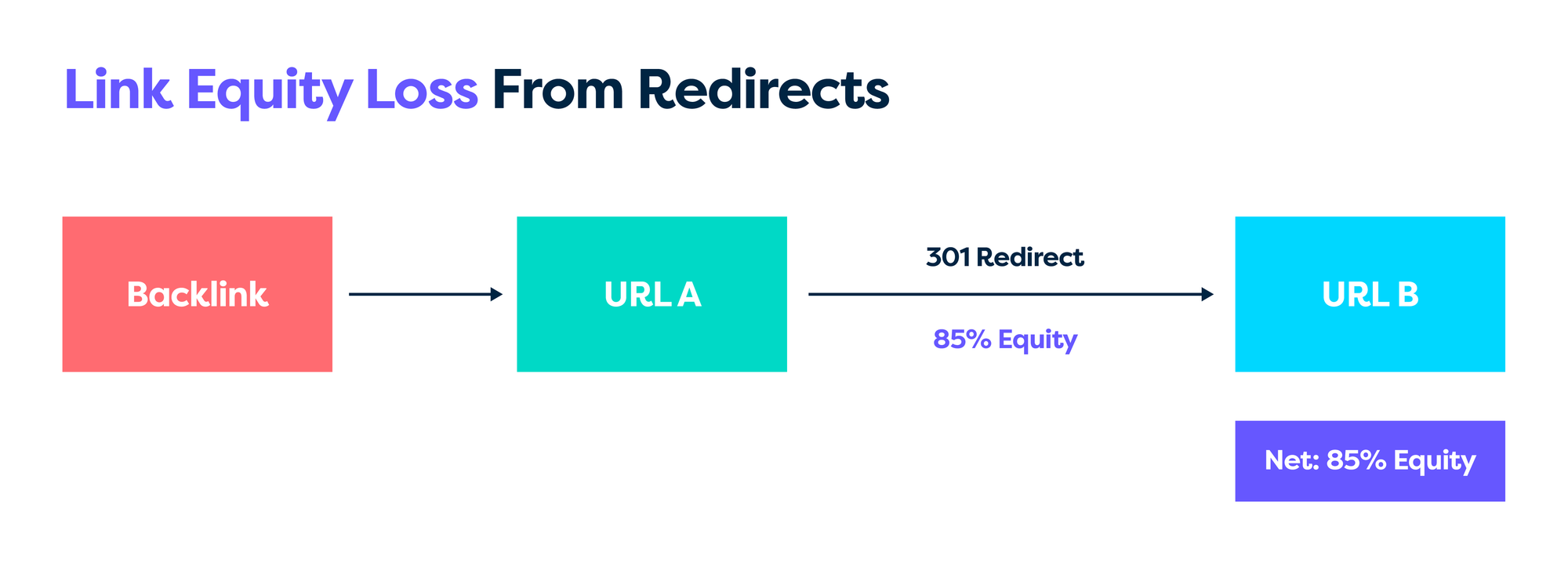
Nofollow on internal links blocks equity flow and should be used only on rare occasions. Deep placement also hurts. As mentioned earlier, pages that drift deeper over time lose authority and crawl attention.
Footer or sidebar‑heavy linking carries less weight than contextual links, so keep the focus inside the main content.
Broken links waste crawl budget and annoy users, so they need to be fixed as a priority and with regularity.
Internal linking governance: stop the structure from drifting
Internal linking usually fails over time, not all at once. New content gets published, old hubs aren’t updated, navigation stays static, and the architecture slowly drifts out of shape.
To prevent that, internal linking needs simple governance rules, not ad-hoc fixes.
Before any page is published, it should pass a basic internal linking check:
- It links to at least two or three genuinely relevant supporting pages
- It links up to the correct pillar or hub page
- It includes a clear route to a relevant commercial or conversion-focused page where appropriate
If a page can’t be linked naturally into an existing structure, that’s a signal to rethink the topic, not publish it anyway.
Blogs are usually well-maintained. Hubs, category pages, and navigation rarely are.
Someone needs to own:
- Pillar and hub pages (keeping spokes up to date)
- Category structures and internal paths
- Navigation changes that affect depth and authority flow
Without ownership, these areas quickly become stale, and internal links decay even when writers follow the rules.
Governance doesn’t need to be heavy. It just needs to exist. Simple publishing rules and clear ownership are enough to keep internal linking working as the site scales.
Quick checklist:
- Replace 3xx chains with direct links.
- Use descriptive anchors; avoid generic text.
- Keep key pages within three clicks from the homepage.
- Route authority out of the blog to relevant commercial targets.
- Fix 404s and refresh or remove dead content.
- Prefer contextual links over sitewide templates.
Conclusion
An internal linking audit is not a one‑off task. Regular maintenance keeps equity flowing, topics clear, and important pages close to the surface.
Start with the big wins: connect authoritative pages to commercial pages, fix 404s, reduce redirects, and remove orphans. Bake simple rules into your publishing workflow so structure does not drift as you scale.
I'd recommend running quick checks monthly and a full audit each quarter. Map new content into existing clusters as a habit.
FAQs
Question 1: How many internal links should each page have?
There is no magic number because context matters more than totals. Aim to link to two to five closely related pages within the body copy. Avoid long lists of weak links that blur topical focus. Commercial pages usually need more internal links pointing to them than they send out.
Question 2: Should I use the same anchor text for all internal links to a page?
No, because repetition looks artificial and adds risk. Use your primary keyword in a sensible share of links, then mix in partial matches and natural language. Keep every anchor relevant to the target page. That balance sends strong signals without looking forced.
Question 3: How often should I conduct an internal linking audit?
Active sites benefit from a full internal linking audit every quarter. A monthly sweep for broken links and new orphans is smart and quick. Run an audit after migrations, structural changes, or large content launches. Bigger sites may add continuous monitoring to identify issues more quickly.
Question 4: Do footer and sidebar links pass the same authority as contextual links?
No, because contextual links in the main content carry clearer signals. Sitewide links are useful for navigation but are often discounted. Keep global links for core navigation and trust contextual links to move authority. That mix keeps both users and search engines on the right path.